Move from Arc to Rio
To move from Arc, download Rio for Mac, open it, and click Bring everything over on the first screen. Rio reads Arc's files on your Mac and brings over spaces, profiles, pinned tabs, folders, favorites, Today tabs, bookmarks, history, saved passwords and sign-ins. Nothing is uploaded. Rio is free, open source and built on Chromium.
Before you start
Rio is made for the Mac: Apple silicon, macOS 13 or later. You need about 360 MB free and Arc still on that Mac. Rio reads Arc's files where Arc keeps them, so run the import before you delete Arc or its data.
Step by step
- Download Rio. Get Rio.dmg from the download link. It is free.
- Install it. Rio.dmg opens as an install window. Drag Rio into your Applications folder. If you open Rio straight from the disk image or from Downloads, it offers to move itself into Applications.
- Open Rio. Rio is signed with a Developer ID and notarized by Apple, so macOS asks once whether you want to open an app from the internet. Click Open.
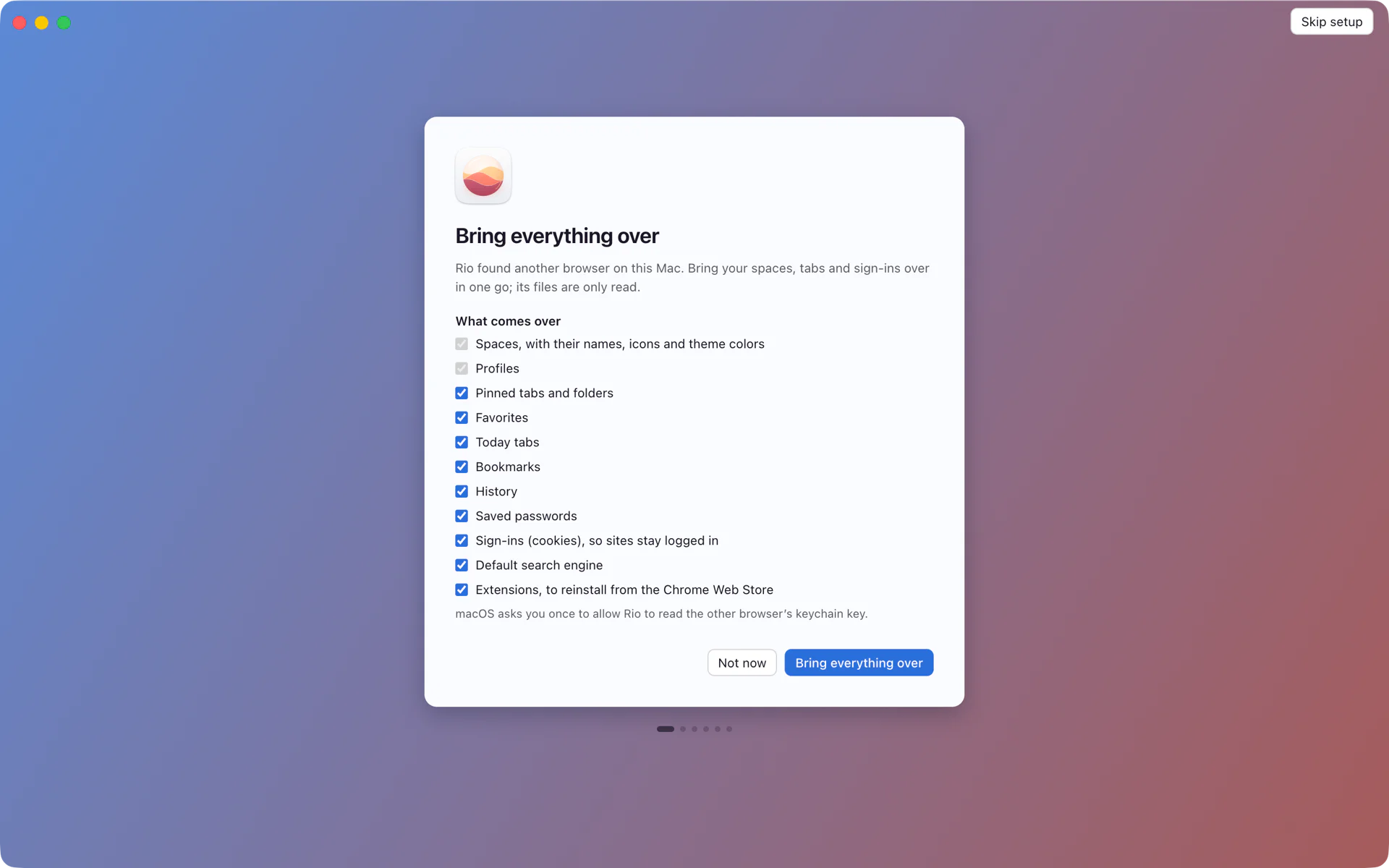
- Click Bring everything over. The first screen says Rio found another browser on this Mac and lists what comes over. Every item starts checked. Uncheck anything you want to leave behind. Spaces and profiles always come over.
- Allow the keychain prompt. macOS asks once whether Rio may read Arc's keychain key. That key unlocks your saved passwords and sign-ins. If you deny it, everything else still comes over.
- Reinstall your extensions. Rio lists the extensions Arc had. Click Reinstall next to each one to open its Chrome Web Store install prompt.
- Read the summary. Rio reports what it brought over, for example "Imported 2 profiles, 4 spaces, 9 pinned tabs, 3 Today tabs, 2 favorites", plus history, passwords and cookies, and how many items it skipped.
What comes over
- Spaces, with their names, icons and theme colors
- Profiles, so spaces on different profiles keep separate logins
- Pinned tabs and folders
- Favorites
- Today tabs
- Bookmarks, as a pinned folder named Imported bookmarks in the first space of each profile
- History
- Saved passwords
- Sign-ins (cookies), so sites stay logged in
- Default search engine
- Extensions, listed to reinstall from the Chrome Web Store
Privacy: everything is read on your Mac
The import reads Arc's files on your disk and writes them into Rio's profile on the same disk. It uploads nothing.
Your spaces, pinned tabs, folders and favorites come from one file, ~/Library/Application Support/Arc/StorableSidebar.json. History, passwords and cookies come from Arc's profiles in the User Data folder next to it. Arc encrypts passwords and cookies with a key it keeps in your login keychain under Arc Safe Storage. That is the item macOS asks you about, and Rio reads it once for the import. Rio has no account, no analytics and no crash reports. The import code is open source, so you can read exactly what it touches in Rio's source on GitHub.
If you skipped it
The first-launch screen asks once. To run the import later, open Settings, General, Import from Arc. If you already imported, Rio asks whether to replace the earlier import.
Next
- Spaces in Rio, to see where everything landed
- Rio vs Arc, feature by feature
- Questions about Rio
Questions
Does the Arc import upload anything?
No. Rio reads Arc's files on your Mac, and macOS asks once before Rio reads Arc's saved passwords. Rio has no account and sends no analytics.
Will my sites stay logged in?
Yes, if you allow Rio to read Arc's keychain key when macOS asks. Rio then brings over your sign-ins (cookies) with your saved passwords. If you say no, Rio skips passwords and sign-ins and tells you so in the import summary.
Do my Arc extensions come over?
Rio lists the Chrome Web Store extensions you had in Arc. Reinstall on each one opens Chrome's install prompt, so you add them back one click at a time.
I skipped the import. Can I run it later?
Yes. Open Settings, General, Import from Arc. If you imported before, Rio asks whether to replace the earlier import.
Can I import from Chrome instead?
Yes. Import from Google Chrome brings bookmarks, history, saved passwords, cookies and site data, so your sites stay signed in.
Do I have to import before December 22?
Arc stops working on December 22, 2026. Rio reads Arc's files on your Mac, so run the import before you delete Arc or its data.
Sources
- Rio releases, build 1446: signed, notarized, install window (November 12, 2026)
- Rio releases, build 1055: onboarding asks once to bring your Arc setup over (November 11, 2026)
- Rio releases, build 1250: Chrome import brings passwords, cookies and site data (November 11, 2026)
- Rio source, the import checklist (SwitchImport.tsx)
- Rio source, what the Arc import reads and returns (ipc/data.ts)
- Rio source, Import from Arc in Settings, General (GeneralPane.tsx)
- Rio source code on GitHub, including the Arc importer
- Arc Help Center, Arc sunset: key dates and what to expect (October 22, 2026)
