The command bar
Press Cmd+T in Rio to open the command bar. Type a few letters to switch to an open tab, search the web, go to an address, run a command such as Capture, or ask ChatGPT, Claude or Grok. Rio is free, open source under GPL-3.0 and needs no account.
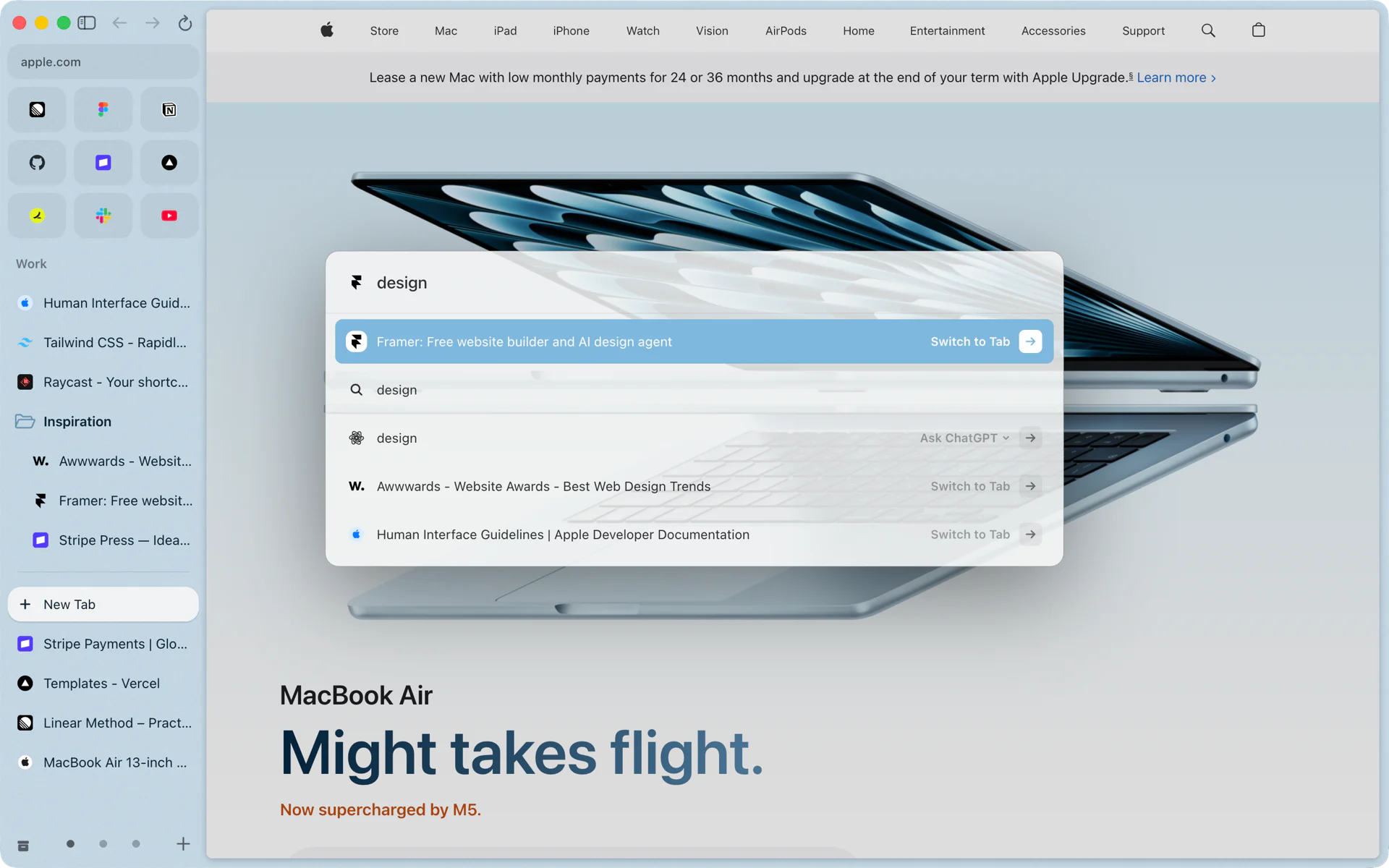
Find an open tab
You want the Framer page you opened this morning. Press Cmd+T and type design. The first row switches to the open Framer tab. Below it are a web search for design, an Ask ChatGPT row, and two more open tabs that match. Press Return and you are on the Framer tab.
What you can type
- Part of an open tab's name to switch to it.
- A search, sent to your search engine. Google is the default; each profile can use DuckDuckGo, Bing, Brave or Ecosia instead.
- An address. chrome://, about: and rio:// addresses open the page instead of searching.
- A command. Capture, Clear Today Tabs, Open Library, Copy URL as Markdown, Reopen Closed Tab and more run from the bar.
- A question for ChatGPT, Claude or Grok. Ask opens the assistant in a tab with your question as the first message. Pick the assistant with the menu on the Ask row.
Keys worth knowing
| Key | What it does |
|---|---|
| Cmd+T | Open the command bar |
| Cmd+L | Edit the address of the current page |
| Shift+Cmd+2 | Start a capture |
| Cmd+Shift+T | Reopen the last closed tab |
| Cmd+Shift+C | Copy the page's URL |
Questions
What does Cmd+T do in Rio?
It opens the command bar. From there you can switch to an open tab, search, type an address, run a command or ask an AI assistant. Cmd+L edits the address of the page you are on.
Can I change the search engine?
Yes. Each profile can use Google, DuckDuckGo, Bing, Brave or Ecosia. Google is the default.
Which AI does Ask use?
ChatGPT by default. Switch to Claude or Grok with the menu on the Ask row, or turn the row off in Settings, AI. Ask opens the assistant in a tab with what you typed as the first message.
Does the command bar send what I type?
Only to your search engine, for suggestions. Ask sends your text to the assistant you picked when you choose that row.
Sources
- Rio source, Cmd+T and Cmd+L (commands/command.ts)
- Rio source, Ask assistant and search engine settings (settings.ts)
- Rio releases, build 1446: Capture from the command bar (November 12, 2026)
- Rio releases, build 1407: chrome://, about: and rio:// addresses open from the command bar (November 12, 2026)
- Rio source, the Ask row and its assistants (command/ask.ts)
- Rio source, Ask in the Command Bar switch (AiPane.tsx)
- Rio README, command bar
