Chrome side panel extensions on Mac, next to the page
Rio runs Chrome's side panel extensions on the Mac. Install one from the Chrome Web Store and its panel opens on the right, next to the page, as it does in Chrome, so a dictionary, notes tool or AI assistant stays beside what you are reading. Arc does not support side panels. Rio is free and open source.
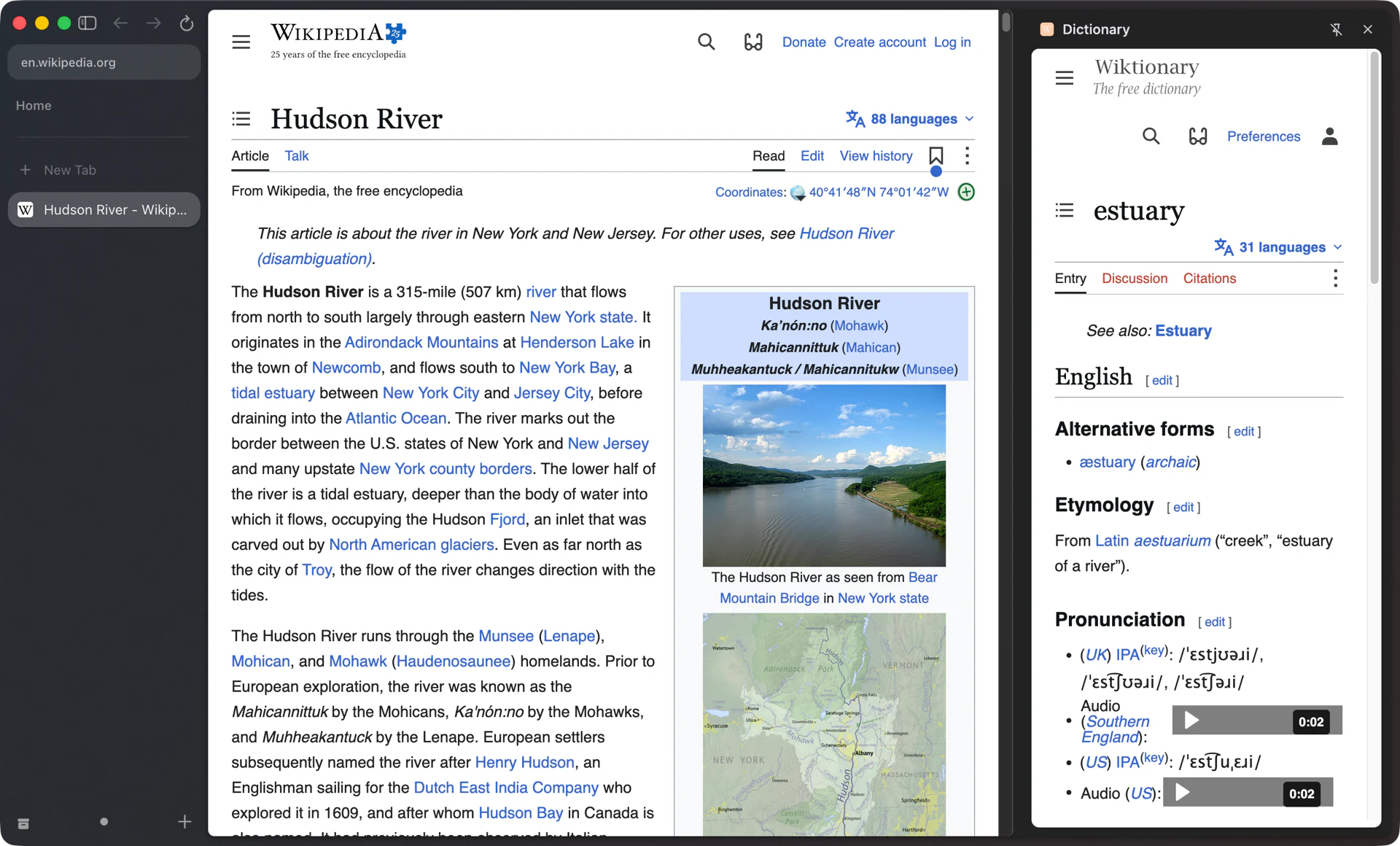
A panel beside the page
You are reading the Hudson River article on Wikipedia and hit the word estuary. Click your dictionary extension and its panel slides in on the right with the Wiktionary entry: pronunciation, etymology and the Latin it comes from. The article stays where it was on the left. Close the panel and keep reading.
That is a side panel extension. Chrome added the sidePanel API in Chrome 114, and since then extensions can show a full-height page next to the website you are on. A popup closes the moment you click back into the page. A side panel stays open while you read, scroll and click, which is what you want from a dictionary, a notes tool or an AI assistant that reads the page with you.
Where side panels work
| Browser | Side panel extensions |
|---|---|
| Rio | Yes, on the right next to the page |
| Chrome | Yes, since Chrome 114 |
| Arc | No |
| Safari | No; Safari extensions don't have Chrome's sidePanel API |
If you came from Arc, this is something you couldn't do there. Page Assist, an extension that runs local AI models in a side panel, lists Arc's sidebar as not supported in its own README. In Rio it opens on the right like it does in Chrome.
Installing one
- Open the Chrome Web Store in Rio.
- Find the extension and click Add to Chrome. Rio is built on Chromium 158, so the store installs it the same way, Manifest V3 extensions included.
- Open the extension. Its panel opens on the right.
Your tabs stay in the sidebar on the left and the extension's panel sits on the right, with the page between the two.
Extensions that work with tabs
Some extensions do more than show a panel. Browser automation assistants open their own tabs and windows and then drive them. Since build 1407, extensions that open their own tabs and windows can find and control those tabs in Rio, as they do in Chrome.
Extensions per profile
Each profile in Rio keeps its own logins, cookies, history and extensions. If you keep a work space on a work profile, the extensions you install there stay in your work spaces, and your personal space keeps its own set. Settings, Profiles lists your profiles and how many spaces use each one.
Coming from Arc
Rio's Arc import lists the Chrome Web Store extensions you had in Arc. Click Reinstall next to each one and Chrome's install prompt opens, so you add them back one click at a time. Then install the side panel extensions Arc couldn't run.
Questions
What is a side panel extension?
An extension built on Chrome's sidePanel API, available since Chrome 114, that shows its own page in a panel beside the website you are on instead of in a popup.
Where do I get side panel extensions for Rio?
From the Chrome Web Store, like any other Chrome extension. Rio runs Chromium 158 and installs Manifest V3 extensions.
Does Arc support side panel extensions?
No. Page Assist's README lists Arc's sidebar as not supported, and Dust's help forum says Arc doesn't currently support side panels.
Can each space have different extensions?
Each profile keeps its own extensions. Put a space on its own profile and it gets its own set.
Sources
- Chrome for Developers, chrome.sidePanel (Chrome 114 and later)
- Page Assist README, Browser Support (Arc: sidebar not supported)
- Dust community, Arc doesn't currently support side panels (May 2, 2025)
- MDN browser-compat-data, sidePanel (Safari: not supported)
- Rio releases, build 1407: extensions can find and control the tabs they open (November 11, 2026)
- Rio releases, build 1055: Reinstall on an imported extension opens Chrome's install prompt (November 10, 2026)
- Rio source, profiles keep their own extensions (ProfileManager.tsx)
