Moving your Arc passwords and sign-ins to Rio
Rio's Arc import brings your saved passwords and your sign-ins: cookies, site storage and site permissions, so sites stay logged in. It also brings saved addresses. macOS asks once whether Rio may read Arc Safe Storage, the keychain item Arc uses to encrypt them. Everything is read on your Mac and nothing is uploaded.
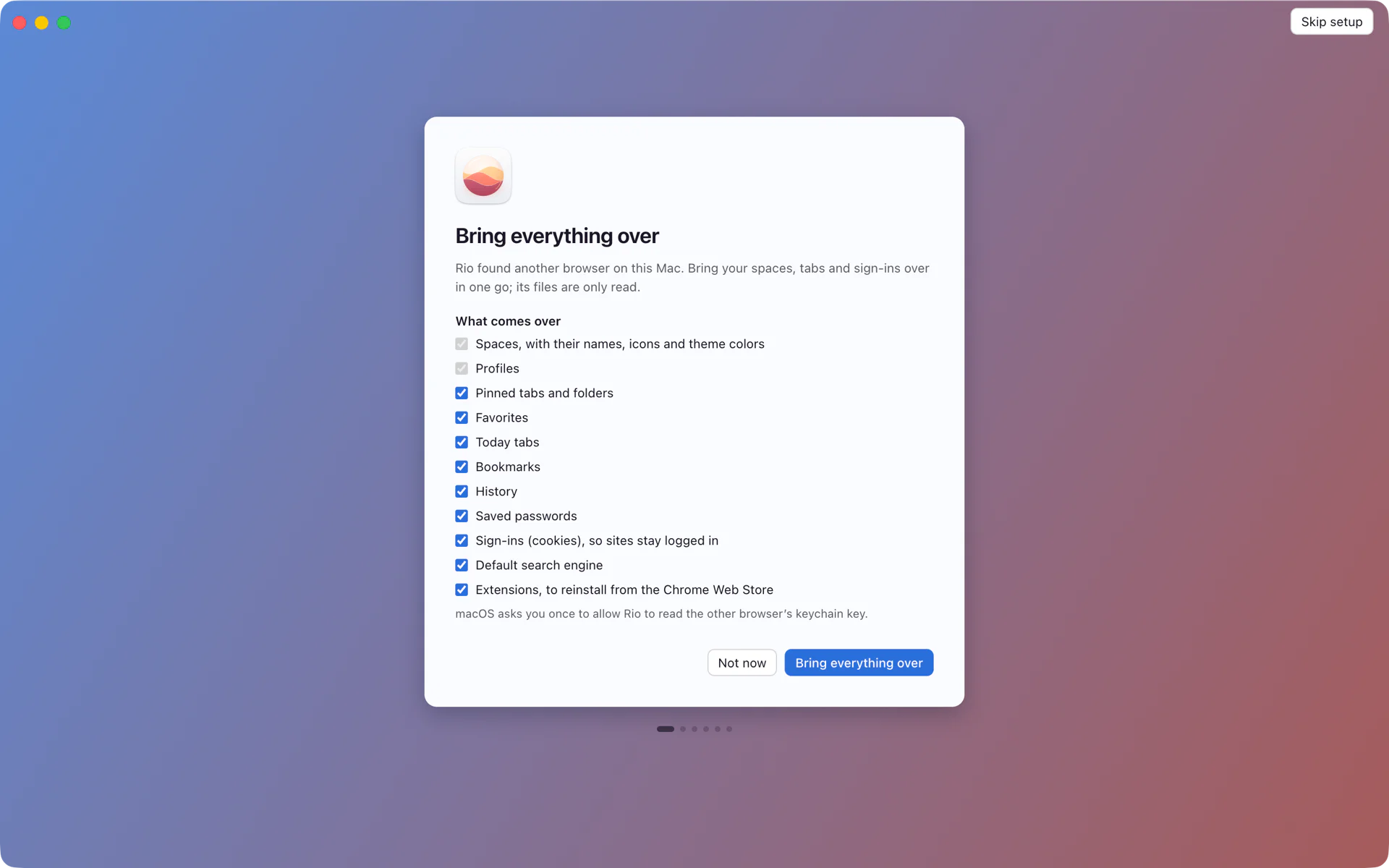
What comes over
Rio's first-launch screen lists everything it can bring from Arc, one checkbox each. Three of them are about getting you signed in:
- Saved passwords. The logins Arc saved for you.
- Sign-ins (cookies, site storage, permissions), so sites stay logged in. Cookies keep you signed in. Site storage is the data web apps keep in your browser. Site permissions are the choices you made, such as letting a site send notifications or use your camera.
- Saved addresses. The addresses Arc filled into checkout and shipping forms.
They come over per profile. If your Arc work spaces used a work profile, those passwords and cookies land in the matching Rio profile, so your work logins stay in your work spaces.
The one prompt you will see
Arc encrypts your saved passwords and cookies, and it keeps what decrypts them in your login keychain as an item named Arc Safe Storage. When Rio reaches that step of the import, macOS asks once whether Rio may read it. The import screen says so under the checklist before you start.
- Allow and your passwords and sign-ins come over.
- Don't Allow and everything else still comes over. The summary at the end says passwords and sign-ins were skipped, and you can run the import again from Settings, General, Import from Arc.
Rio reads Arc's files without changing them. Arc keeps working with its own passwords until it shuts down on December 22, 2026.
The first morning after
You open Rio and your Work space looks the way it did in Arc. Gmail is pinned at the top and opens to your inbox, signed in. Linear and GitHub open signed in too. On a site you log into by hand, Rio offers the password you saved in Arc.
That is the point of bringing cookies with the passwords. A list of links, which is what Arc's own export saves, would leave you signing in to every site again.
Where your passwords live in Rio
Rio uses Chromium's password manager, so saved passwords fill in the way they do in Chrome. To see or edit them:
- Choose Window, Passwords in the menu bar, or
- Press Cmd+T and type passwords. The command bar also finds it as saved passwords or password manager.
Each profile keeps its own logins, cookies, history and extensions. Settings, Profiles shows the data of each one under Your Data and Settings.
Passwords from somewhere else
- Google Chrome. Import from Google Chrome brings bookmarks, history, saved passwords, cookies and site data, so your sites stay signed in. Since build 1310 it never overwrites a password you already saved in Rio.
- A password manager or another browser. If it can export a CSV file, use Import passwords from a CSV file in Rio's Settings. It opens Chromium's own password import.
Privacy
The whole import runs on your Mac. It reads Arc's files and writes into Rio's profile on the same disk, and it uploads nothing. Rio has no account, sends no analytics and no crash reports, and the import code is open source on GitHub, so you can read exactly what it touches.
Questions
Will my sites stay logged in after the import?
Yes, when you allow the keychain prompt. Rio brings your cookies, site storage and site permissions along with your saved passwords, so Gmail, GitHub and the rest open signed in.
I clicked Don't Allow on the keychain prompt. What now?
Everything else came over, and the summary tells you passwords and sign-ins were skipped. Run the import again from Settings, General, Import from Arc and allow the prompt this time.
Where do I see my passwords in Rio?
Choose Window, Passwords, or press Cmd+T and type passwords. Rio uses Chromium's password manager, the same one Chrome uses.
Does Rio upload my passwords?
No. The import reads Arc's files on your Mac and writes into Rio's profile on the same Mac. Rio has no account and sends no analytics.
Sources
- Rio source, the import checklist (SwitchImport.tsx)
- Rio source, what the Arc import reads and returns (ipc/data.ts)
- Rio source, the Passwords command (commands/capabilities.ts)
- Rio source, profiles keep their own logins (ProfileManager.tsx)
- Rio releases, build 1250: Chrome import brings passwords, cookies and site data (November 11, 2026)
- Rio releases, build 1310: Chrome import never overwrites passwords saved in Rio (November 11, 2026)
