Vertical tabs on Mac: how Rio's sidebar works
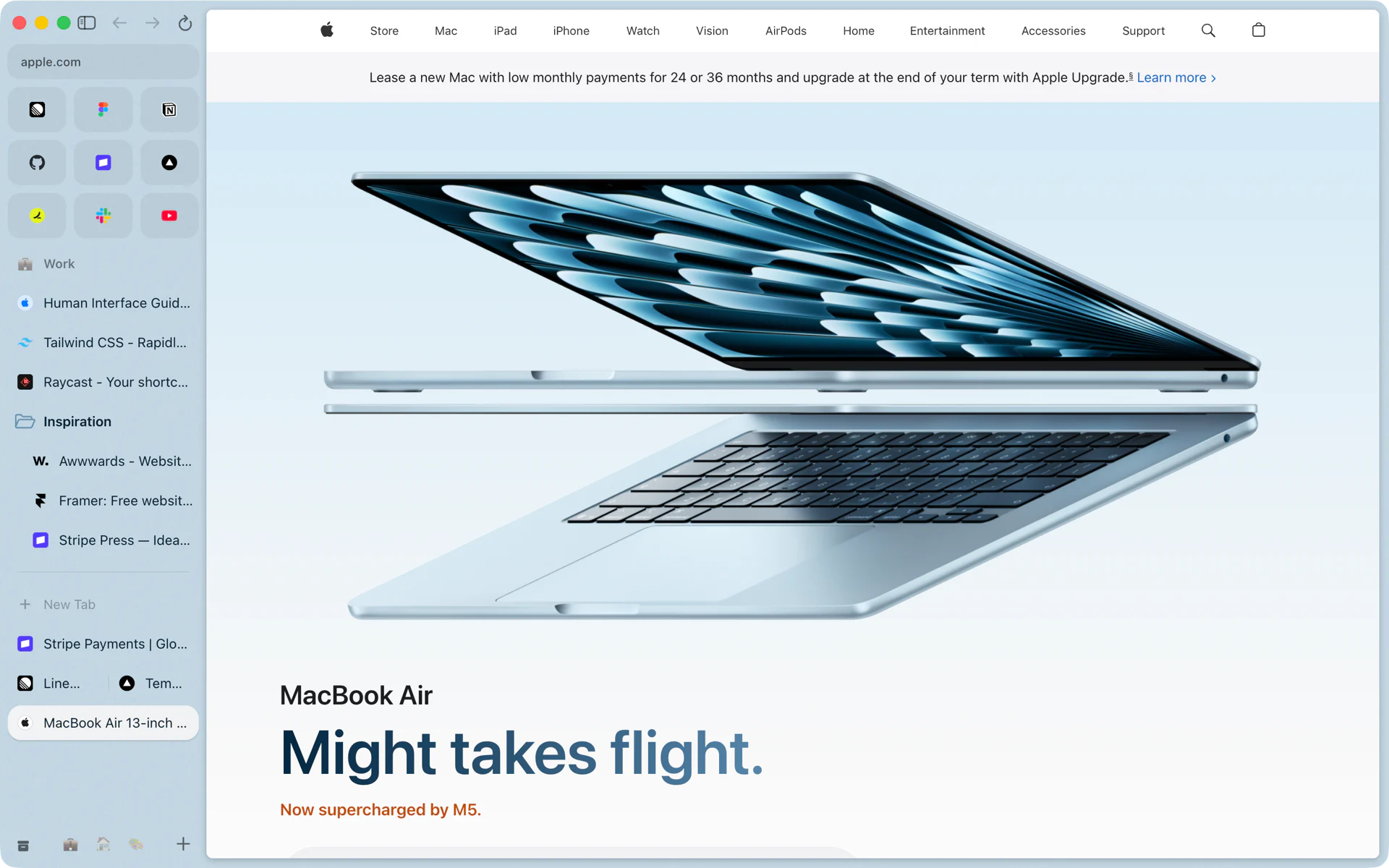
Rio keeps your tabs in a sidebar on the left of the window. Favorites sit in a grid at the top, pinned tabs and folders below them, then New Tab and the tabs you opened today. Each space has its own sidebar. Cmd+S hides it, and it slides back out when you move the pointer to the left edge.
Why a sidebar
A MacBook screen is wider than it is tall. A row of tabs across the top shrinks every title as you open more, until each one is an icon. A sidebar gives each tab a full row with its title. When I moved off Arc, I had 38 pinned tabs and 29 favorites to keep, and a sidebar was the only layout I wanted them in.
Chrome added vertical tabs in April 2026, and Safari's are in the macOS 27.3 beta. Rio's sidebar runs on macOS 13 or later and splits your tabs into spaces, each with favorites, pinned tabs and Today tabs that archive themselves.
Top to bottom
The address. The top of the sidebar shows where you are. Cmd+L edits it and Cmd+T opens the command bar.
Favorites. The sites you open all day sit in a grid of icons. Some do more than open: the Gmail favorite shows an unread dot and, on hover, a card with your newest mail. Hover a Google Calendar or Meet favorite and you see a compact view of your day.
Pinned tabs and folders. Drag a tab up to pin it, drop it into a folder, double-click to rename anything. A pinned tab remembers the page it was pinned on, so you can click around inside it and come back. Tabs, Reset all tabs in this Space puts every pinned tab back on its pinned page. A pinned Google Calendar shows your next event and today's date. View, Collapse Pinned Tabs folds the section away when you need the room.
New Tab and Today tabs. Everything you open lands here. Rio archives these tabs after 12 hours by default, or after 24 hours, 7 days or 30 days if you pick that in Settings, Profiles. Cmd+Shift+K clears them all at once, and the toast that follows has Undo. Once more than six Today tabs pile up, a broom appears above them; click it and Tidy Tabs groups them.
The bottom bar. One icon per space. Click one, or swipe with two fingers to move between them.
Three ways to show it
- Docked. The default. The sidebar sits beside the page.
- Hidden. Press Cmd+S and the page takes the full width. Move the pointer to the left edge and the sidebar slides out over the page. It stays out while you rename, make a folder or use the Library, then tucks away.
- With a toolbar. Cmd+Shift+D adds an address bar across the top of the page. Settings, Advanced can show the full URL in it instead of only the host.
Settings, Advanced also has haptic feedback when reordering tabs, on by default: the trackpad ticks as a tab drops into place.
Keys for the sidebar
| Key | What it does |
|---|---|
| Cmd+S | Hide or show the sidebar |
| Cmd+1 to Cmd+9 | Go to tab 1 to 9 |
| Cmd+Option+Down, Cmd+Option+Up | Next or previous tab |
| Ctrl+Tab | Next recent tab |
| Cmd+D | Pin or unpin the tab |
| Cmd+Shift+K | Clear Today tabs |
| Ctrl+1 to Ctrl+9 | Go to space 1 to 9 |
Every one of these can be changed in Settings, Shortcuts.
Bring your sidebar with you
If you used Arc, Rio's first screen offers Bring everything over. It reads Arc's files on your Mac and rebuilds your spaces, pinned tabs, folders, favorites and Today tabs.
Questions
How do I hide the sidebar in Rio?
Press Cmd+S. Move the pointer to the left edge of the window and the sidebar slides out over the page while you use it. Press Cmd+S again to dock it.
Do pinned tabs stay when I quit?
Yes. Pinned tabs stay until you unpin them, and each remembers the page it was pinned on.
What happens to the tabs I open?
They land below New Tab as Today tabs. Rio archives them after 12 hours by default, or after 24 hours, 7 days or 30 days. Archived tabs are in the Library.
Can I bring my Arc sidebar into Rio?
Yes. On first launch, Bring everything over imports your Arc spaces, pinned tabs, folders, favorites and Today tabs.
Sources
- Rio source, sidebar and toolbar shortcuts (commands/shell.ts)
- Rio source, tab shortcuts and Collapse Pinned Tabs (commands/tabs.ts)
- Rio source, Clear Today Tabs and Undo (commands/archive.ts)
- Rio source, Today tab archive and haptic settings (settings.ts)
- Rio source, Tidy Today's broom (tidy.ts)
- Rio releases, build 1055: the hidden sidebar comes out sooner (November 10, 2026)
- Rio releases, build 1250: the Gmail favorite's unread dot and newest mail (November 11, 2026)
- Rio releases, build 1310: Calendar and Meet favorites show your day (November 11, 2026)
- Rio releases, build 1407: a pinned Calendar shows your next event (November 11, 2026)
- Google, New Chrome productivity features (vertical tabs, April 7, 2026)
- 9to5Mac, macOS 27.3 beta adds vertical tabs to Safari (November 3, 2026)
