The command bar: everything you can do from Cmd+T
Press Cmd+T in Rio and type. The command bar switches to an open tab, searches the web, opens an address, runs a command such as Capture or Clear Today Tabs, jumps straight to the top result with Shift+Return, or asks ChatGPT, Claude or Grok. Rio is a free, open-source browser for Mac built on Chromium.
One key for everything new
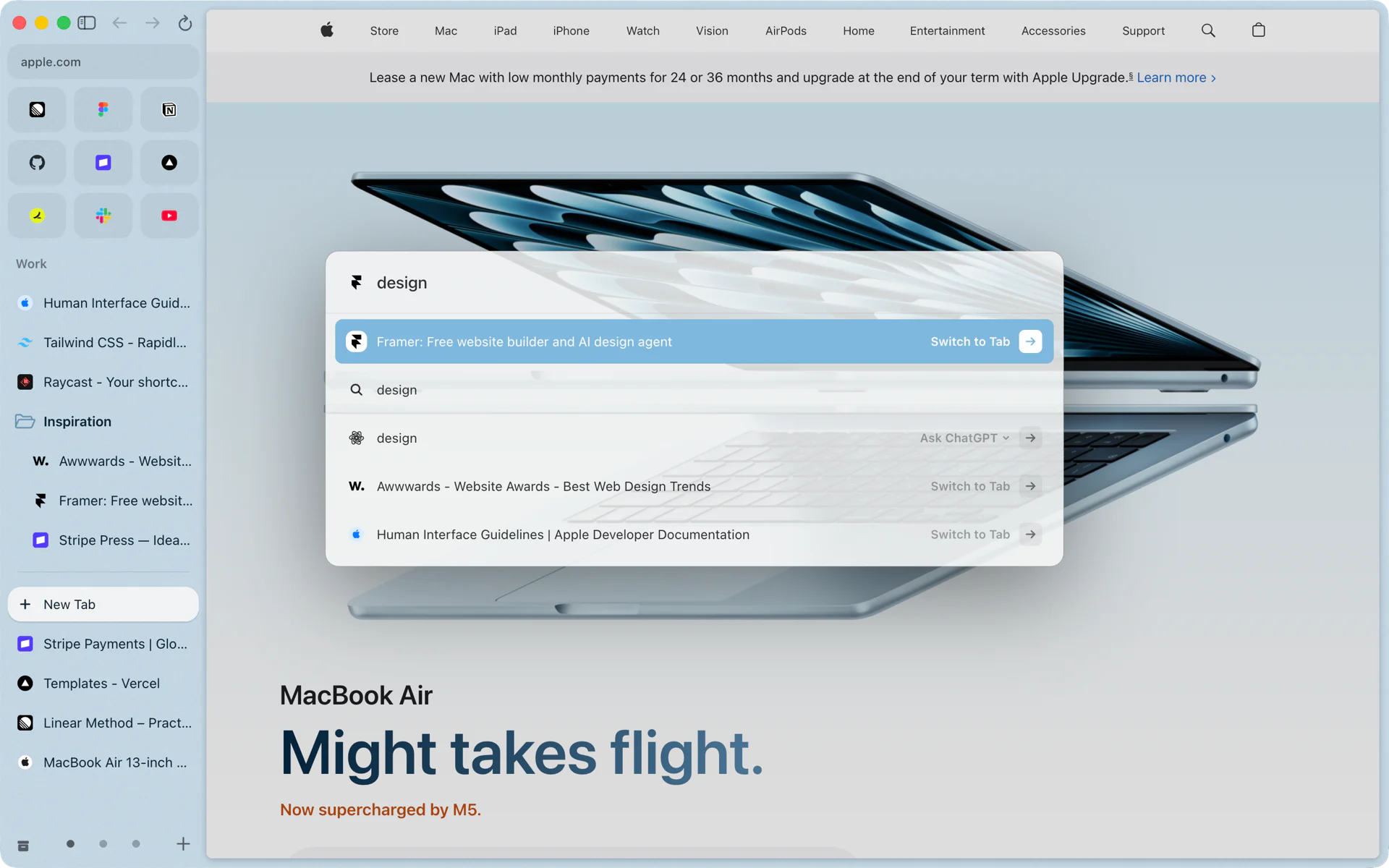
You want the Framer page you opened this morning. Press Cmd+T and type design. The first row switches to the open Framer tab. Below it are a web search for design, an Ask ChatGPT row and two more open tabs that match. Press Return and you are on the Framer tab, with no duplicate opened.
That is the habit the command bar builds: before opening something, type it, and Rio finds it if it is already open.
What you can type
- Part of an open tab's name to switch to it.
- A search, sent to your profile's search engine. Google is the default; each profile can use DuckDuckGo, Bing, Brave Search or Ecosia instead.
- An address. Since build 1407, chrome://, about: and rio:// addresses open the page instead of searching for it.
- A command name, to run it. More below.
- A question for ChatGPT, Claude or Grok. The Ask row opens the assistant in a tab with your text as the first message. ChatGPT is the default; switch with the menu on the row.
Shift+Return: straight to the top result
Type a search and press Shift+Return instead of Return. Rio skips the page of results and opens the top result directly. Type stripe docs webhooks, press Shift+Return, and you land on Google's top result for it. This is Instant Links, on by default, with its own switch in Settings, AI features.
Commands you can run by name
Many of Rio's menu commands run from the bar. Type a few letters of the name and press Return.
| Type | What runs |
|---|---|
| capture | Capture, a screenshot of part of the page, copied to your clipboard |
| clear today | Clear Today Tabs |
| reopen | Reopen Closed Tab |
| library | Open Library |
| markdown | Copy URL as Markdown |
| passwords | Passwords, Rio's password manager |
| permissions | Site Permissions for the page you are on |
| stay on top | Stay On Top, which keeps the window above the others |
| clear cookies | Clear Cookies and Refresh, for the site you are on |
| zap | Zap Elements, to hide parts of a page |
| new space | New Space |
| theme | Edit Theme, the colors of the space you are in |
| import from arc | Import from Arc |
| check for updates | Check for Updates |
| shortcuts | Essential Keyboard Shortcuts |
| report | Report a Problem, with Rio's and macOS's versions filled in |
Commands also answer to other words. Type screenshot and Capture comes up. Type always on top for Stay On Top, saved passwords for Passwords, and bring everything over for Import from Arc.
Keys worth knowing
| Key | What it does |
|---|---|
| Cmd+T | Open the command bar |
| Cmd+L | Edit the address of the page you are on |
| Return | Open the top row |
| Shift+Return | Go straight to the top search result |
| Shift+Cmd+2 | Start a capture |
| Cmd+Shift+T | Reopen the last closed tab |
| Cmd+Shift+C | Copy the page's URL |
What the bar sends
What you type goes to your search engine for suggestions, as in any browser. The Ask row sends your text to the assistant you picked, and only when you choose that row. You can hide the Ask row in Settings, AI features.
Questions
What is the difference between Cmd+T and Cmd+L?
Cmd+T opens the command bar for anything new: a tab, a search, an address or a command. Cmd+L edits the address of the page you are on.
What does Shift+Return do in the command bar?
It is Instant Links: on a search, it skips the results page and goes straight to the top result. Turn it off in Settings, AI features.
Can I change the search engine?
Yes. Each profile can use Google, DuckDuckGo, Bing, Brave or Ecosia. Google is the default.
Does the command bar send what I type?
Only to your search engine, for suggestions. Ask sends your text to the assistant you picked when you choose that row.
Sources
- Rio source, Cmd+T, Cmd+L and Copy URL as Markdown (commands/command.ts)
- Rio source, every command and its aliases (src/shared/commands)
- Rio source, Instant Links and the Ask row in Settings, AI features (AiPane.tsx)
- Rio source, search engines and the Ask assistant (settings.ts)
- Rio releases, build 1446: Capture from the command bar (November 12, 2026)
- Rio releases, build 1407: chrome://, about: and rio:// addresses open from the command bar (November 11, 2026)
