Peek
Peek in Rio opens a link in a card over the page you are reading, so you can look without losing your place. Shift-click any link to Peek at it. Close it to go back, or keep it as a tab or in a split view. Rio is a free, open-source Chromium browser for Mac.
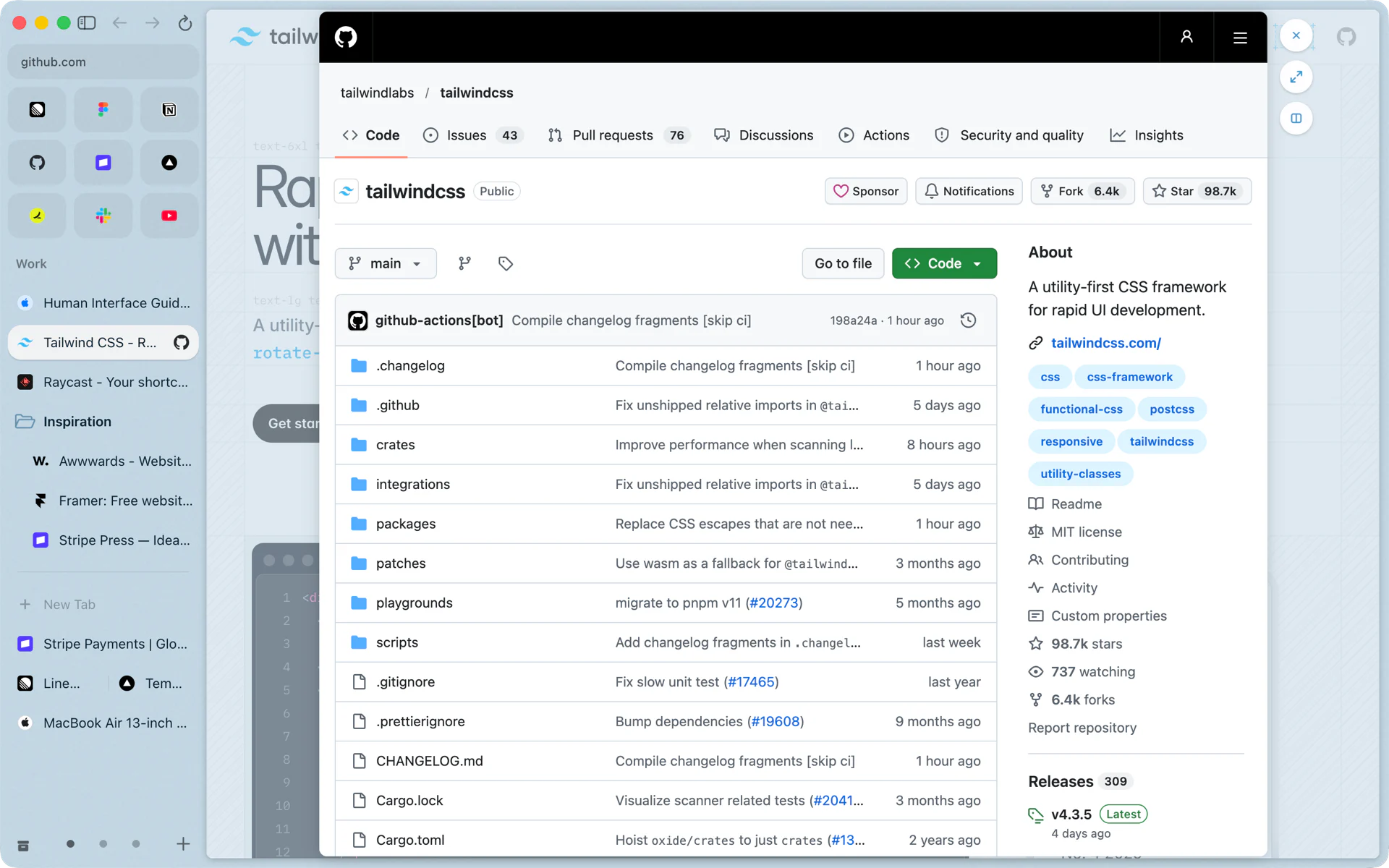
A link from your pinned Gmail
Gmail is pinned in your Work space. An email links to a Figma file a designer shared. Click it. Figma opens in Peek, a card over Gmail, because links from pinned tabs and favorites to other sites open there. Leave your comment on the design, close the card, and Gmail is exactly where you left it, still on Gmail.
Three ways in
- Shift-click any link. It opens in Peek instead of a new tab.
- Click a link to another site from a favorite or a pinned tab. Your pinned Gmail, Slack or Notion stays on its own site.
- Hold Shift over a link with Hover Previews on. The page opens in Peek with a short summary, and closes when you move away.
The first two live in Settings, Links, and both are on by default.
Inside a Peek
- The card unfolds from where you clicked, over the dimmed page.
- Beside its top right corner are three buttons: Close, Open as tab (Cmd+Shift+O) and Open in split, which puts the page next to yours in a split view.
- Click outside the card to close it.
- The page in the card works like any page: go back, reload and click around.
Some links stay out of Peek on purpose. A form you submit keeps going as a normal page, and a sign-in pop-up a site opens at a set size stays a pop-up, so the sign-in works the way the site built it.
Links from other apps: the Mini window
A link you click in Slack, Mail or any other app opens in a Mini window: a small, simple Rio window for a quick look, like a link a friend sent you. If you want to keep the page, press Cmd+O to open it in your current space, or Cmd+Shift+O to pick the space. Cmd+Option+N opens a new Mini window. The switch is in Settings, Links.
Questions
How do I open a link in Peek?
Shift-click it. Links to other sites from your favorites and pinned tabs open in Peek too. You can turn either off in Settings, Links.
How do I keep a page I opened in Peek?
Press Cmd+Shift+O or click Open as tab to make it a tab, or click Open in split to put it next to your page.
Why did a link from my pinned Gmail open in Peek?
Links from favorites and pinned tabs to other sites open in Peek, so the pinned tab stays on its own site. Switch it off in Settings, Links.
What is a Mini window?
A small, simple Rio window for a quick look at a link you clicked in another app, such as Slack or Mail. Cmd+O moves its page into your current space.
Sources
- Rio source, the Links settings for Peek and Mini windows (LinksPane.tsx)
- Rio source, Peek and Mini window settings on by default (settings.ts)
- Rio source, the Peek card and its Close, Open as tab and Open in split buttons (PeekChrome.tsx)
- Rio source, Open Peek as Tab and the Mini window keys (commands/multitask.ts)
- Rio source code on GitHub, including when a link opens in Peek
